Some providers waste precious IPv4 addresses by routing them to the customer facing PE interface. This makes three IPv4 addresses unusable by the customer (network, broadcast, gateway). Additionally, it makes it difficult to use the remaining IPv4 addresses inside the customers infrastructure. The PE expects them to be connected to the customer facing interface. Additionally, the PE equipment can, typically, not be configured by a customer.
This post demonstrates a way to route one IPv4 address (or more) out of a local subnet through your infrastructure.
The following picture shows the simulated infrastructure. The IP 10.10.10.4 actually lives behind an internal router, but still is reachable by the provider’s equipment.
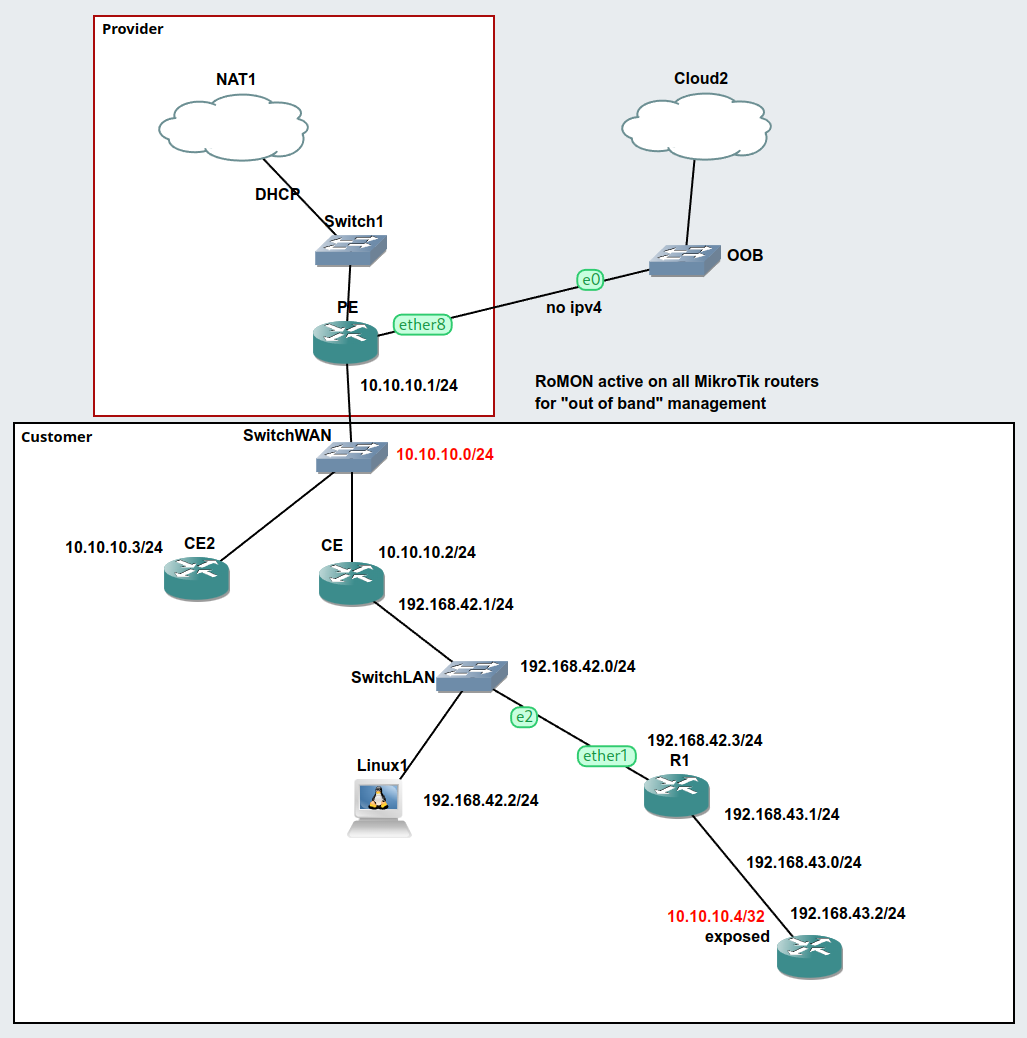
The configuration is as follows.
PE
The provider equipment. 10.10.10.0/24 is a stand-in for the “public IP” subnet. Nothing special here.
/ip address
add address=10.10.10.1/24 interface=ether2 network=10.10.10.0
/ip dhcp-client
add interface=ether1
/ip firewall nat
add action=masquerade chain=srcnat out-interface=ether1
/system identity
set name=PE
CE2
This is just to prove that additional devices on the public subnet can also reach the IP address in question (think web server, etc.). Note that there is no special configuration.
/ip address
add address=10.10.10.3/24 interface=ether1 network=10.10.10.0
/ip dns
set servers=9.9.9.9
/ip route
add disabled=no dst-address=0.0.0.0/0 gateway=10.10.10.1 routing-table=main \
    suppress-hw-offload=no
/system identity
set name=CE2
CE
The customer equipment has a route to the special IPv4 address 10.10.10.4 pointing towards the inner network. Additionally, proxy-arp is enabled on the interface with the address 10.10.10.2/24 (from/on the public subnet). Masquerading is configured to mimic real life scenarios.
/interface ethernet
set [ find default-name=ether1 ] arp=proxy-arp disable-running-check=no
/ip address
add address=10.10.10.2/24 interface=ether1 network=10.10.10.0
add address=192.168.42.1/24 interface=ether2 network=192.168.42.0
/ip dns
set servers=9.9.9.9
/ip firewall nat
add action=masquerade chain=srcnat out-interface=ether1
/ip route
add disabled=no dst-address=0.0.0.0/0 gateway=10.10.10.1 routing-table=main \
    suppress-hw-offload=no
add disabled=no distance=1 dst-address=10.10.10.4/32 gateway=192.168.42.3 \
    pref-src=0.0.0.0 routing-table=main scope=30 suppress-hw-offload=no \
    target-scope=10
add disabled=no dst-address=192.168.43.0/24 gateway=192.168.42.3 routing-table=\
    main suppress-hw-offload=no
/system identity
set name=CE
Linux1
A simple (Alpine) Linux container to run additional pings/traceroutes. The file /etc/network/interfaces has the following contents. Again, there is no special configuration.
auto eth0
iface eth0 inet static
	address 192.168.42.2
	netmask 255.255.255.0
	gateway 192.168.42.1
	up echo nameserver 9.9.9.9 > /etc/resolv.conf
R1
R1 is just a router. No proxy-arp or such. However, there is a route to the special IPv4 address.
/ip address
add address=192.168.43.1/24 interface=ether2 network=192.168.43.0
add address=192.168.42.3/24 interface=ether1 network=192.168.42.0
/ip dhcp-client
add interface=ether1
/ip dns
set servers=9.9.9.9
/ip route
add gateway=192.168.42.1
add disabled=no dst-address=10.10.10.4/32 gateway=ether2 routing-table=main \
    suppress-hw-offload=no
/system identity
set name=R1
exposed
This node has the special IPv4 address 10.10.10.4/32 assigned to it’s interface. Again, no proxy-arp etc.
/ip address
add address=192.168.43.2/24 interface=ether1 network=192.168.43.0
add address=10.10.10.4 interface=ether1 network=10.10.10.4
/ip dns
set servers=9.9.9.9
/ip route
add disabled=no distance=1 dst-address=0.0.0.0/0 gateway=192.168.43.1 pref-src=0.0.0.0 \
    routing-table=main scope=30 suppress-hw-offload=no target-scope=10
/system identity
set name=exposed