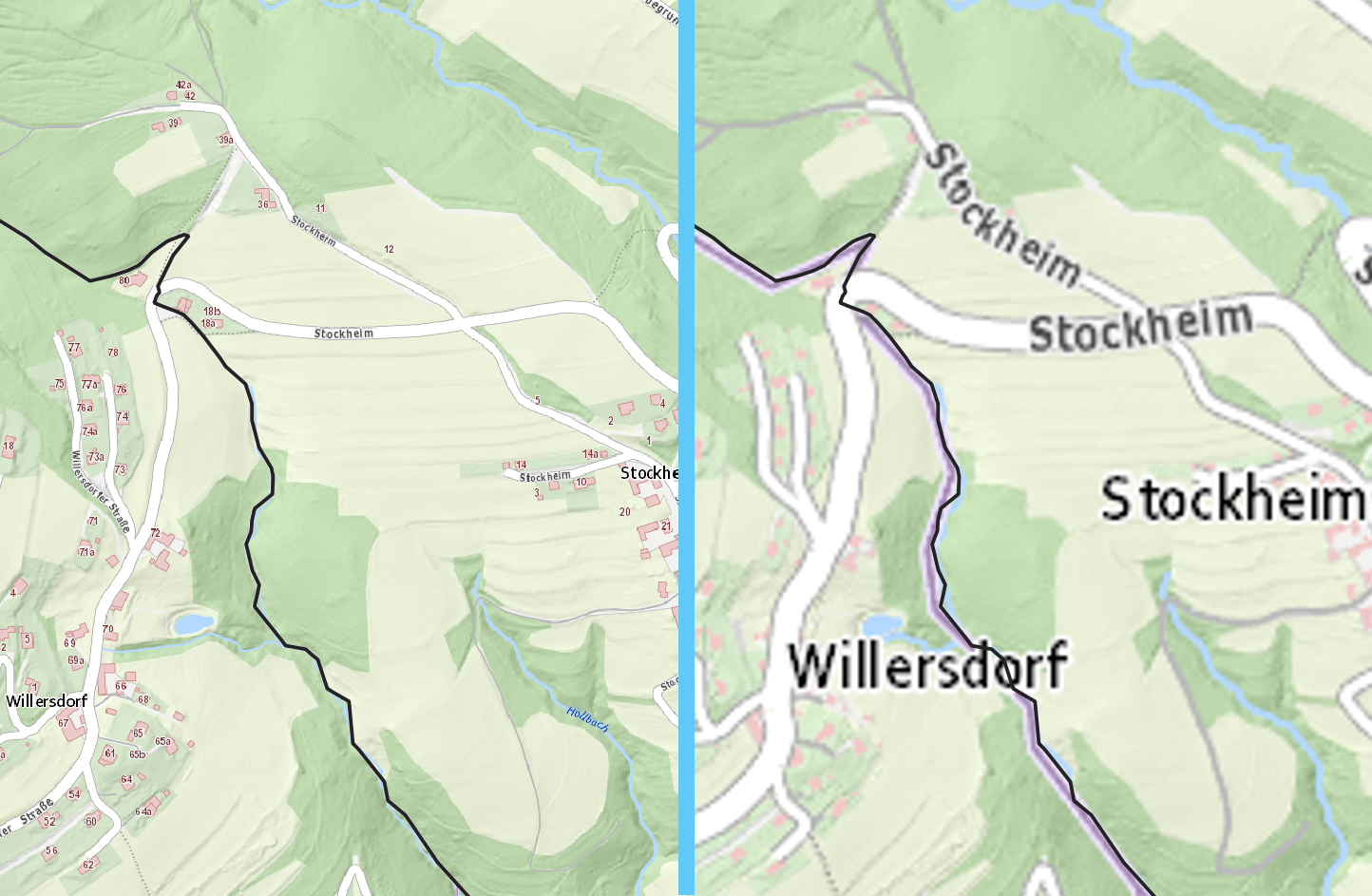
Quansheng UV-K5

Backup calibration and config!
Firmware: F4HWM https://github.com/armel/uv-k5-firmware-custom
Flash via Browser: https://egzumer.github.io/uvtools/?firmwareURL=https://github.com/armel/uv-k5-firmware-custom/raw/main/archive/f4hwn.packed.v2.8.1.bin
Configure with chirp: https://github.com/kk7ds/chirp
Codeplugs via memory-channels-processor: https://oe3lrt.gitlab.io/memory-channels-processor/latest/codeplug_chirp.html

Codeplugs

$ memory-channels-processor --source "oevsv-repeater-db" --band 70cm --type "fm" --output-file "chirp_fm_70cm_gen_oevsv-repeater-db_name-9-char-mode.csv" --output-format="chirp" --name-format "callsign" --name-format "custom" --name-format-custom "{{ name | replaceumlauts | removespaces | substring(0,9) | ljust(9, ' ') }}{{ mode_short }}"
$ memory-channels-processor --source "oevsv-repeater-db" --band 2m --type "fm" --output-file "chirp_fm_2m_gen_oevsv-repeater-db_name-9-char-mode.csv" --output-format="chirp" --name-format "callsign" --name-format "custom" --name-format-custom "{{ name | replaceumlauts | removespaces | substring(0,9) | ljust(9, ' ') }}{{ mode_short }}"
$ memory-channels-processor --source "fm-channels-iaru-r1" --band 70cm --type "fm" --output-file "chirp_fm_70cm_gen_fm-channels-iaru-r1_name-10-char.csv" --output-format="chirp" --name-format "custom" --name-format-custom "{{ name | replaceumlauts | removespaces | substring(0,10) | ljust(10, ' ') }}"
$ memory-channels-processor --source "fm-channels-iaru-r1" --band 2m --type "fm" --output-file "chirp_fm_2m_gen_fm-channels-iaru-r1_name-10-char.csv" --output-format="chirp" --name-format "custom" --name-format-custom "{{ name | replaceumlauts | removespaces | substring(0,10) | ljust(10, ' ') }}"

chirp Issues under debian

As of 2024-07-02, chirp has issues and needs a patch under a current debian stable install:

$ git diff
diff --git a/chirp/wxui/main.py b/chirp/wxui/main.py
index cf55f582..81b481fa 100644
--- a/chirp/wxui/main.py
+++ b/chirp/wxui/main.py
@@ -970,11 +970,11 @@ class ChirpMain(wx.Frame):
         self.bug_report_item = wx.MenuItem(
             help_menu, wx.NewId(),
             _('Report or update a bug...'))
-        self.bug_report_item.Enable(False)
         self.Bind(wx.EVT_MENU,
                   functools.partial(bugreport.do_bugreport, self),
                   self.bug_report_item)
         help_menu.Append(self.bug_report_item)
+        self.bug_report_item.Enable(False)
 
         menu_bar = wx.MenuBar()
         menu_bar.Append(file_menu, wx.GetStockLabel(wx.ID_FILE))

Run chirp with ./chirpwx.py.

MikroTik: Route one IP of a local subnet through your infrastructure

Some providers waste precious IPv4 addresses by routing them to the customer facing PE interface. This makes three IPv4 addresses unusable by the customer (network, broadcast, gateway). Additionally, it makes it difficult to use the remaining IPv4 addresses inside the customers infrastructure. The PE expects them to be connected to the customer facing interface. Additionally, the PE equipment can, typically, not be configured by a customer.

This post demonstrates a way to route one IPv4 address (or more) out of a local subnet through your infrastructure.

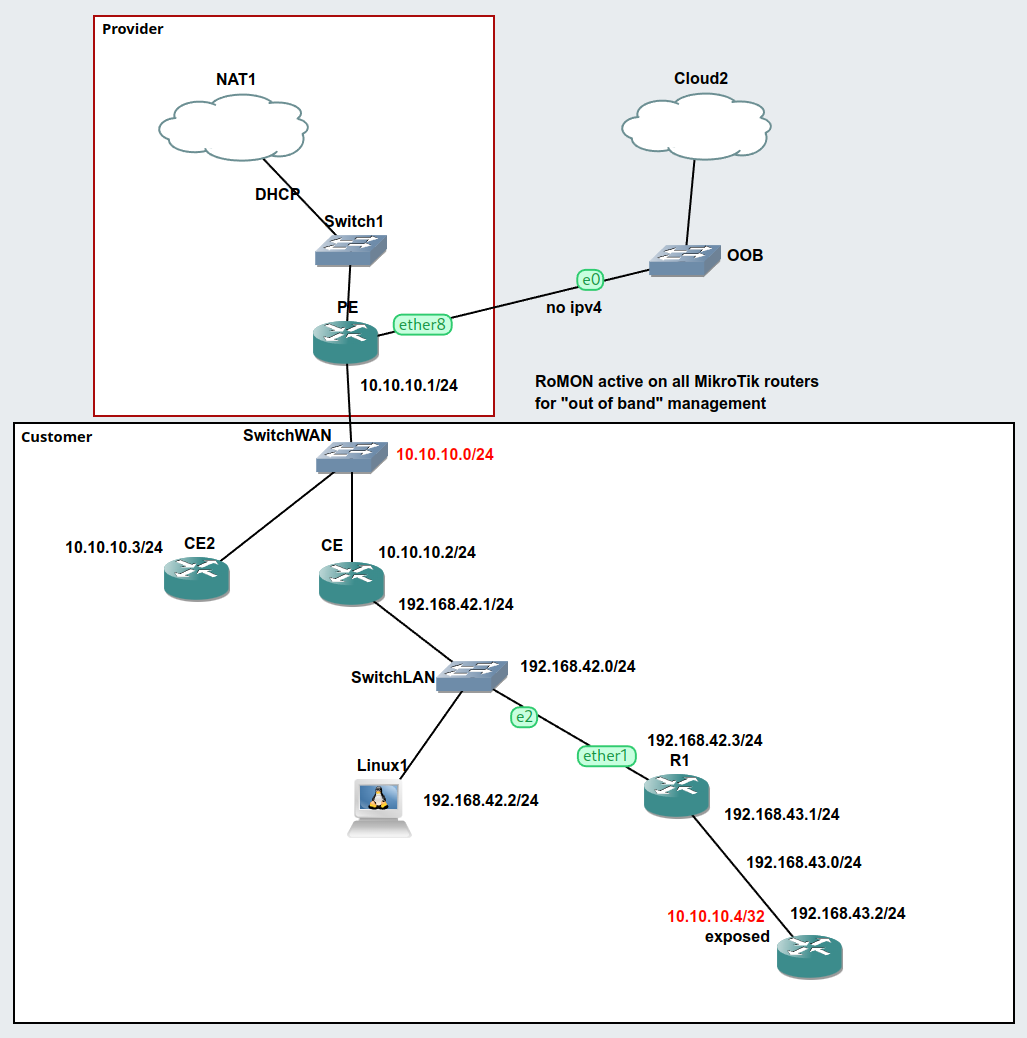
The following picture shows the simulated infrastructure. The IP 10.10.10.4 actually lives behind an internal router, but still is reachable by the provider’s equipment.

The configuration is as follows.

PE

The provider equipment. 10.10.10.0/24 is a stand-in for the “public IP” subnet. Nothing special here.

/ip address
add address=10.10.10.1/24 interface=ether2 network=10.10.10.0
/ip dhcp-client
add interface=ether1
/ip firewall nat
add action=masquerade chain=srcnat out-interface=ether1
/system identity
set name=PE

CE2

This is just to prove that additional devices on the public subnet can also reach the IP address in question (think web server, etc.). Note that there is no special configuration.

/ip address
add address=10.10.10.3/24 interface=ether1 network=10.10.10.0
/ip dns
set servers=9.9.9.9
/ip route
add disabled=no dst-address=0.0.0.0/0 gateway=10.10.10.1 routing-table=main \
    suppress-hw-offload=no
/system identity
set name=CE2

CE

The customer equipment has a route to the special IPv4 address 10.10.10.4 pointing towards the inner network. Additionally, proxy-arp is enabled on the interface with the address 10.10.10.2/24 (from/on the public subnet). Masquerading is configured to mimic real life scenarios.

/interface ethernet
set [ find default-name=ether1 ] arp=proxy-arp disable-running-check=no
/ip address
add address=10.10.10.2/24 interface=ether1 network=10.10.10.0
add address=192.168.42.1/24 interface=ether2 network=192.168.42.0
/ip dns
set servers=9.9.9.9
/ip firewall nat
add action=masquerade chain=srcnat out-interface=ether1
/ip route
add disabled=no dst-address=0.0.0.0/0 gateway=10.10.10.1 routing-table=main \
    suppress-hw-offload=no
add disabled=no distance=1 dst-address=10.10.10.4/32 gateway=192.168.42.3 \
    pref-src=0.0.0.0 routing-table=main scope=30 suppress-hw-offload=no \
    target-scope=10
add disabled=no dst-address=192.168.43.0/24 gateway=192.168.42.3 routing-table=\
    main suppress-hw-offload=no
/system identity
set name=CE

Linux1

A simple (Alpine) Linux container to run additional pings/traceroutes. The file /etc/network/interfaces has the following contents. Again, there is no special configuration.

auto eth0
iface eth0 inet static
	address 192.168.42.2
	netmask 255.255.255.0
	gateway 192.168.42.1
	up echo nameserver 9.9.9.9 > /etc/resolv.conf

R1

R1 is just a router. No proxy-arp or such. However, there is a route to the special IPv4 address.

/ip address
add address=192.168.43.1/24 interface=ether2 network=192.168.43.0
add address=192.168.42.3/24 interface=ether1 network=192.168.42.0
/ip dhcp-client
add interface=ether1
/ip dns
set servers=9.9.9.9
/ip route
add gateway=192.168.42.1
add disabled=no dst-address=10.10.10.4/32 gateway=ether2 routing-table=main \
    suppress-hw-offload=no
/system identity
set name=R1

exposed

This node has the special IPv4 address 10.10.10.4/32 assigned to it’s interface. Again, no proxy-arp etc.

/ip address
add address=192.168.43.2/24 interface=ether1 network=192.168.43.0
add address=10.10.10.4 interface=ether1 network=10.10.10.4
/ip dns
set servers=9.9.9.9
/ip route
add disabled=no distance=1 dst-address=0.0.0.0/0 gateway=192.168.43.1 pref-src=0.0.0.0 \
    routing-table=main scope=30 suppress-hw-offload=no target-scope=10
/system identity
set name=exposed

Fonira.at Internet Access with Mikrotik RouterOS (fixed IPv4 and /60 IPv6)

Fonira provides private customers with a fixed IPv4 address and a /60 IPv6 prefix for a comparably small monthly fee. If you are reading this before you subscribe, please use the offer code (Empfehlungscode) VoQ7z9 to get yourself and me a bonus. See the quote including the link at the end for details.

TL;DR

# nov/10/2022 23:21:04 by RouterOS 6.49.7
/interface vlan add interface=ether1 name=vlan31-fonira vlan-id=31
/interface pppoe-client add add-default-route=yes default-route-distance=10 disabled=no interface=vlan31-fonira name=pppoe-fonira password=Password user=UserID
/interface list member add interface=pppoe-fonira list=WAN
/ipv6 dhcp-client add interface=pppoe-fonira request=address
/ipv6 address add address=2001:0DB8:0:1::/64 eui-64=yes interface=bridge

Configuration

This configuration assumes a recent default router configuration as a starting point (WAN and LAN interface lists, corresponding IPv4 and IPv6 firewall setup, ether1 connected to modem). Keep your UserID, password and IPv6 prefix ready and follow these steps. Your static IPv4 address will be assigned automatically. For security reasons, keep the modem disconnected from the router during the setup! These steps have been extracted from a running config on RouterOS version 6.49.7.

First, add a VLAN interface. The provided modem (ZYXEL VMG4005-B50A) is configured such that VLAN 31 (tagged) provides the internet service.

/interface vlan add interface=ether1 name=vlan31-fonira vlan-id=31

Add a PPPoE client. The fixed IP service is provided via PPPoE, the correct “static” IPv4 address is assigned automatically. Note: If you have your modem connected during this step, the router will become accessible from the internet immediately. The default firewall config would allow forwarding to the internal network.

/interface pppoe-client add add-default-route=yes default-route-distance=10 disabled=no interface=vlan31-fonira name=pppoe-fonira password=Password user=UserID

Add the PPPoE interface to the WAN interface list. The default firewall config blocks forwarding from the WAN interfaces to other (internal) networks and performs SRC-NAT (masquerading) for outgoing IPv4 traffic. You can connect your modem after this step.

/interface list member add interface=pppoe-fonira list=WAN

Add a DHCPv6 client to the PPPoE interface. That way the router learns its default route, DNS servers etc.

/ipv6 dhcp-client add interface=pppoe-fonira request=address

Add an IPv6 address to your local (LAN) bridge and advertise the route (replace 2001:0DB8:0:1::/64 with a prefix in your assigned range). Note: The default /ipv6 nd config will thankfully also include IPv6 DNS servers learned via DHCPv6 in the announcements. Thus, any clients will be automatically configured via SLAAC.

/ipv6 address add address=2001:0DB8:0:1::/64 eui-64=yes interface=bridge

If your desktop operating system is younger than 15 years (as of 2022) all that is left to do is to visit https://ipv6.google.com/ in your browser to verify IPv6 connectivity. This google subdomain will successfully load via IPv6 only.

Fonira.at Offer Code (Empfehlungscode)

Quoting an e-mail from Fonira:

Sind Sie mit unseren Produkten und dem Service zufrieden? Wir freuen uns über eine Weiterempfehlung! Bei jedem empfohlenen Neukunden erhalten Sie 10 Euro Gutschrift, der Neukunde kann aus attraktiven, kostenfreien Prämien wählen. Mehr zum Programm, Teilnahmebedingungen und geeigneten Produktgruppen finden Sie auf https://fonira.at/empfehlung

Ihr individueller Empfehlungscode lautet: VoQ7z9

Limit WMTS zoom level in QGIS

The high resolution in printouts may lead to illegible basemaps. With XYZ-Tiles, one can specify the “Max. Zoom Level” in the connection properties. I found no easy way to limit the zoom level for WMTS layers. But there is a workaround.

Download the capabilities.xml to your project folder. For example, open https://basemap.at/wmts/1.0.0/WMTSCapabilities.xml in the browser, press Ctrl+S, navigate to the project directory, and hit save. Open the file with your favorite text editor. Towards the end of the file, one finds the TileMatrix definitions for the various zoom levels. Delete unneeded entries or make them an xml-comment by putting <!-- and --> around them:

<!-- The comment starts here
<TileMatrix>
<ows:Identifier>18</ows:Identifier>
[...]
</TileMatrix>
<TileMatrix>
<ows:Identifier>19</ows:Identifier>
[...]
</TileMatrix>
The comment ends here -->

Locate the xml-file in the QGIS Browser panel and add the layer to the project.

For a smoother look when zoomed in, pull up the layer’s symbology and set “Zoomed: in ” to “Cubic”. The setting can be found in the layer properties dialog or the “Layer Styling” panel.

Adressregister INSPIRE Stichtag 01.10.2022 – View für Adressen erzeugen und Indizes anlegen

Das Adressregister liegetbeim BEV als GeoPackage vor. Es handelt sich also um eine sqlite-Datenbank. Der Zugriff mit QGIS, speziell die Filterung nach Attributen, stellt bisweilen eine Geduldsprobe dar. Eine Inspektion der .gpkg-Datei mit dem DB Browser for SQLite zeigt, dass es jenseits der Primärschlüssel keinen Index in der Datenbank gibt.

Mit taktisch günstig gewählten Indizes kann die Geschwindigkeit beim Zugriff deutlich erhöht werden.

Um in einer Atlas-Anwendung Hausnummern in die Karte zeichnen zu können, und eine Liste von Adressen in einem Kartenausschnitt zu erhalten, ist es notwendig die Tabellen in der .gpkg-Datei zu verknüpfen. Es sieht in der Karte schöner aus, wenn die Hausnummern nicht an der Zugangskoordinate sondern am Gebäude gerendert werden. Leider haben nicht alle Adressen ein Gebäude zugeordnet (auch wenn dieses schon vor mehr als einem Jahrzehnt errichtet wurde). Es gilt also einen entsprechenden View zu erzeugen.

Was ist eigentlich eine Adresse?

Rechtsgültige Adressen in Österreich sind aktuell in der Adressregisterverordnung 2016 (BGBl. II Nr. 51/2016) definiert und bestehen aus (hier sinngemäß widergegeben):

  • Straßennamen oder Straßennamen abgekürzt
  • daneben stehend die Orientierungsnummer (Hausnummer) und die Adressdaten des Gebäudes
  • darunter die Postleitzahl und
  • daneben der Zustellort

Diese Informationen finden sich in:

  • AD_ThoroughfareName.text
  • AD_AddressLocatorMatchingTable.addressIdentifierGeneral
  • AD_BuildingGeometry.buildingIdentifier
  • AD_PostalDescriptor.postCode
  • AD_AddressAreaName.text

Der eindeutige Verweis auf eine Gemeinde erfolgt entweder über den geografischen Bezug (Verschneidung mit einer Administrative Boundary) oder über die Gemeindekennzahl GKZ:

  • AD_Municipality.localId_GKZ bzw.
  • AD_Municipality.text

Verknüpft werden diese mit den Punkten aus AD_AddressGeometry und AD_BuildingGeometry über die Tabelle AD_AddressLocatorMatchingTable mit dem Attribut localId_ADRCD.

Indizes

Um den Zugriff auf den Datenbestand zügig zu gestalten sollte zumindest für die verknüpfungsrelevanten Attribute ein Index erstellt werden. Diese sind:

  • AD_AddressLocatorMatchingTable.localId_ADRCD
  • AD_AddressLocatorMatchingTable.inspireID_SKZ
  • AD_AddressLocatorMatchingTable.inspireID_ZO
  • AD_AddressLocatorMatchingTable.inspireID_PLZ
  • AD_AddressLocatorMatchingTable.inspireID_OKZ (nicht zwingend notwendig)
  • AD_AddressLocatorMatchingTable.inspireID_GKZ (nicht zwingend notwendig)
  • AD_AddressAreaName.inspireId_ZO
  • AD_AreaName.inspireId_OKZ (nicht zwingend notwendig)
  • AD_Municipality.inspireId_GKZ (nicht zwingend notwendig)
  • AD_Municipality.localId_GKZ (nicht zwingend notwendig)
  • AD_Municipality.text (nicht zwingend notwendig)
  • AD_PostalDescriptor.inspireId_PLZ
  • AD_ThoroughfareName.inspireId_SKZ
  • AD_AddressGeometry.localId_ADRCD
  • AD_BuildingGeometry.localId_ADRCD
CREATE INDEX "index_AD_AddressLocatorMatchingTable_localId_ADRCD" ON "AD_AddressLocatorMatchingTable" (
	"localId_ADRCD"
);
CREATE INDEX "index_AD_AddressLocatorMatchingTable_inspireId_SKZ" ON "AD_AddressLocatorMatchingTable" (
	"inspireId_SKZ"
);
CREATE INDEX "index_AD_AddressLocatorMatchingTable_inspireId_ZO" ON "AD_AddressLocatorMatchingTable" (
	"inspireId_ZO"
);
CREATE INDEX "index_AD_AddressLocatorMatchingTable_inspireId_PLZ" ON "AD_AddressLocatorMatchingTable" (
	"inspireId_PLZ"
);
CREATE INDEX "index_AD_AddressLocatorMatchingTable_inspireId_OKZ" ON "AD_AddressLocatorMatchingTable" (
	"inspireId_OKZ"
);
CREATE INDEX "index_AD_AddressLocatorMatchingTable_inspireId_GKZ" ON "AD_AddressLocatorMatchingTable" (
	"inspireId_GKZ"
);

CREATE INDEX "index_AD_AddressAreaName_inspireId_ZO" ON "AD_AddressAreaName" (
	"inspireId_ZO"
);

CREATE INDEX "index_AD_AreaName_inspireId_OKZ" ON "AD_AreaName" (
	"inspireId_OKZ"
);

CREATE INDEX "index_AD_Municipality_inspireId_GKZ" ON "AD_Municipality" (
	"inspireId_GKZ"
);

CREATE INDEX "index_AD_Municipality_localId_GKZ" ON "AD_Municipality" (
	"localId_GKZ"
);

CREATE INDEX "index_AD_Municipality_text" ON "AD_Municipality" (
	"text"
);

CREATE INDEX "index_AD_PostalDescriptor_inspireId_PLZ" ON "AD_PostalDescriptor" (
	"inspireId_PLZ"
);

CREATE INDEX "index_AD_ThoroughfareName_inspireId_SKZ" ON "AD_ThoroughfareName" (
	"inspireId_SKZ"
);

CREATE INDEX "index_AD_AddressGeometry_localId_ADRCD" ON "AD_AddressGeometry" (
	"localId_ADRCD"
);

CREATE INDEX "index_AD_BuildingGeometry_localId_ADRCD" ON "AD_BuildingGeometry" (
	"localId_ADRCD"
);

AddressLocatorMatchingTable_flat

Entsteht durch die Verknüpfung von AD_AddressLocatorMatchingTable mit

  • AD_ThoroughfareName
  • AD_AddressAreaName
  • AD_PostalDescriptor
  • AD_AreaName
  • AD_Municipality
CREATE VIEW AddressLocatorMatchingTable_flat
AS
SELECT
	AD_AddressLocatorMatchingTable.localId_ADRCD,
	AD_AddressLocatorMatchingTable.addressIdentifierGeneral Hausnummer,
	AD_ThoroughfareName.text Strasse,
	AD_AddressAreaName.text Zustellort,
	AD_PostalDescriptor.postCode PLZ,
	AD_AreaName.text Ortsname,
	AD_Municipality.localId_GKZ GKZ,
	AD_Municipality.text Gemeinde
FROM
	AD_AddressLocatorMatchingTable
JOIN
	AD_ThoroughfareName ON AD_ThoroughfareName.inspireId_SKZ = AD_AddressLocatorMatchingTable.inspireId_SKZ
JOIN
	AD_AddressAreaName ON AD_AddressAreaName.inspireId_ZO = AD_AddressLocatorMatchingTable.inspireId_ZO
JOIN
	AD_PostalDescriptor ON AD_PostalDescriptor.inspireId_PLZ = AD_AddressLocatorMatchingTable.inspireId_PLZ
JOIN
	AD_AreaName ON AD_AreaName.inspireId_OKZ = AD_AddressLocatorMatchingTable.inspireId_OKZ
JOIN
	AD_Municipality ON AD_Municipality.inspireId_GKZ = AD_AddressLocatorMatchingTable.inspireId_GKZ

AdressGeometry_flat

Entsteht durch die Verknüpfung von AddressLocatorMatchingTable_flat mit AD_AddressGeometry. Für das Endergebnis nicht relevant, aber für Analysen hilfreich.

CREATE VIEW AddressGeometry_flat
AS
SELECT
AD_AddressGeometry.id,
AD_AddressGeometry.geom,
AddressLocatorMatchingTable_flat.*
FROM
AD_AddressGeometry
JOIN
AddressLocatorMatchingTable_flat ON AddressLocatorMatchingTable_flat.localId_ADRCD = AD_AddressGeometry.localId_ADRCD

BuildingGeometry_flat

Entsteht durch die Verknüfung von AddressLocatorMatchingTable_flat mit AD_BuildingGeometry. Für das Endergebnis nicht relevant, aber für Analysen hilfreich.

CREATE VIEW BuildingGeometry_flat
AS
SELECT
	AD_BuildingGeometry.id,
	AD_BuildingGeometry.geom,
	AD_BuildingGeometry.buildingIdentifier,
	AddressLocatorMatchingTable_flat.*
FROM
	AD_BuildingGeometry
JOIN
	AddressLocatorMatchingTable_flat ON AddressLocatorMatchingTable_flat.localId_ADRCD = AD_BuildingGeometry.localId_ADRCD

Address_flat: Finale Adressen für die Kartografie

Für Adressen ohne Gebäude soll die Koordinate aus AD_AddressGeometry verwendet werden. Andernfalls die Koordinate aus AD_BuildingGeometry. Gibt es eine Koordinate in AD_BuildingGeometry, dann ist auch der buildingIdentifier Teil der Adresse.

CREATE VIEW Address_flat
AS
SELECT
	CASE WHEN AD_BuildingGeometry.geom IS NOT NULL THEN
		AD_BuildingGeometry.geom
	ELSE
		AD_AddressGeometry.geom
	END AS geom,
	AD_AddressGeometry.localId_ADRCD,
	AD_BuildingGeometry.localId_ADRCD_SUBCD,
	CASE WHEN AD_BuildingGeometry.buildingIdentifier IS NOT NULL THEN
		AddressLocatorMatchingTable_flat.Hausnummer || ' ' || AD_BuildingGeometry.buildingIdentifier
	ELSE
		AddressLocatorMatchingTable_flat.Hausnummer
	END AS HausUndGebNummer,
	AddressLocatorMatchingTable_flat.*
FROM
	AD_AddressGeometry
LEFT JOIN
	AD_BuildingGeometry ON AD_AddressGeometry.localId_ADRCD = AD_BuildingGeometry.localId_ADRCD
JOIN
	AddressLocatorMatchingTable_flat ON AD_AddressGeometry.localId_ADRCD = AddressLocatorMatchingTable_flat.localId_ADRCD

Damit der View als Geometrie erkannt wird muss der GeoPackage-Spezifikation noch genüge getan werden und gpkg_contents und gpkg_geometry_columns angepasst werden.

INSERT INTO gpkg_contents
	("table_name",
	"data_type", "identifier",
	"min_x",
	"min_y",
	"max_x",
	"max_y",
	"srs_id")
VALUES
	('Address_flat',
	'features',
	'Address_flat',
	(SELECT MIN(min_x) from gpkg_contents),
	(SELECT MIN(min_y) from gpkg_contents),
	(SELECT MAX(max_x) from gpkg_contents),
	(SELECT MAX(max_y) from gpkg_contents),
	(SELECT srs_id FROM gpkg_contents WHERE table_name = 'AD_AddressGeometry')
	);
INSERT INTO gpkg_geometry_columns
	("table_name",
	"column_name",
	"geometry_type_name",
	"srs_id",
	"z",
	"m")
VALUES
	('Address_flat',
	'geom',
	(SELECT geometry_type_name FROM gpkg_geometry_columns WHERE table_name = 'AD_AddressGeometry'),
	(SELECT srs_id FROM gpkg_geometry_columns WHERE table_name = 'AD_AddressGeometry'),
	0,
	0
	);

Fazit

Leider erkennt QGIS noch immer nicht das CRS (srs_id), das kann man aber bei einem eingefügten Layer auch noch nachträglich festlegen.
Unangenehmer ist die Tatsache, dass die Geometrie durch den Wahlausdruck scheinbar den View verlangsamt.

Future Work: Address_flat als tatsächliche Tabelle ggf. in ein separates .gpkg-File exportieren.
Verwaltungsgrenzen (VGD) INSPIRE Stichtag 01.04.2022 – Zugriff beschleunigen (Indizes anlegen)

Die Verwaltungsgrenzen liegen beim BEV als GeoPackage vor. Es handelt sich also um eine sqlite-Datenbank. Der Zugriff mit QGIS, speziell die Filterung nach Attributen, stellt bisweilen eine Geduldsprobe dar. Eine Inspektion der .gpkg-Datei mit dem DB Browser for SQLite zeigt, dass es jenseits der Primärschlüssel keinen Index in der Datenbank gibt.

Mit taktisch günstig gewählten Indizes kann die Geschwindigkeit beim Zugriff deutlich erhöht werden.

AU_flat_view

Um den Umriss einer einzelnen Gemeinde zu erhalten ist es notwendig im AU_flat_view nach “nationalLevelName” sowie “text” zu filtern. Der View ist wie folgt definiert:

CREATE VIEW "AU_flat_view" AS 
SELECT
AU_AdministrativeUnit.geom,
AU_AdministrativeUnit.inspireId,
AU_Attribute.country,
AU_Attribute.nationalCode,
AU_Attribute.nationalLevel,
AU_Attribute.beginLifespanVersion,
AU_Attribute.nationalLevelName,
AU_Attribute.residenceOfAuthority,
AU_Attribute.upperLevelUnit,
AU_Name.text,
AU_Name.script,
AU_Name.language,
AU_Name.nativeness,
AU_Name.nameStatus,
AU_Name.sourceOfName
FROM
AU_AdministrativeUnit
INNER JOIN AU_Attribute ON AU_AdministrativeUnit.inspireId = AU_Attribute.inspireId
INNER JOIN AU_Name ON AU_AdministrativeUnit.inspireId = AU_Name.inspireId

Für die im JOIN-Statement verwendeten Attribute ist auch kein Index definiert. Es gilt also einen Index zu definieren für:

  • AU_AdministrativeUnit.inspireId
  • AU_Attribute.inspireId
  • AU_Name.inspireId
  • AU_Attribute.nationalLevel
  • AU_Name.text
CREATE INDEX "index_AU_AdministrativeUnit_inspireId" ON "AU_AdministrativeUnit" (
	"inspireId"
);
CREATE INDEX "index_AU_Attribute_inspireId" ON "AB_Attribute" (
	"inspireId"
);
CREATE INDEX "index_AU_Name_inspireId" ON "AU_Name" (
	"inspireId"
);
CREATE INDEX "index_AU_Attribute_nationalLevel" ON "AU_Attribute" (
	"nationalLevel"
);
CREATE INDEX "index_AU_Name_text" ON "AU_Name" (
	"text"
);

OPA – Remix

Unter https://www.team122.at/projekte/opa-ortsplan-adressen/ gibt es ein Projekt welches Adressdaten und Kartenkacheln für Gemeinden aus Salzburg anbietet. Für die Steiermark ist mir leider nichts dergleichen bekannt. Dies ist der Versuch etwas Vergleichbares zu implementieren.

Datenquellen und Ressourcen

  • Grundkarte: https://basemap.at
  • Verwaltungsgrenzen: AT-INSPIRE_AU_Administrative_Units_SHP 01.04.2021.zip via https://bev.gv.at
  • Adressen: Adresse-Relationale_Tabellen_Stichtagsdaten_01102022.zip via https://bev.gv.at
  • Atlas-Erstellung: Claas Leiner “Tricks und Kniffe rund um den QGIS-Atlas”, https://media.ccc.de/v/fossgis2021-9004-tricks-und-kniffe-rund-um-den-qgis-atlas

Ziele

  • Regelmäßiger Blattschnitt
  • Übersichtsseite mit Blattschnitt
  • Sinnvoller Maßstab für die Blätter (OPA verwendet 1:3500)
  • Liste von Adressen in der Gemeinde mit
    • Blattnummer
    • Koordinaten die geeignet sind innerhalb eines Blattes die Adresse zu identifizieren
  • Hausnummern in größerer Schrift der basemap überlagert
  • Projektion in EPSG:31256 (ETRS89, passend zur basemap und den Adressen in meinem Heimatort)
  • Raster in EPSG:4326 (WGS84, passend zu GPS-Koordinaten in lat/lon decimal degrees wie in osm.org/maps.google.com etc)
  • Raster in EPSG:4326 aber dargestellt in degrees, decimal minutes (wie die Funkgeräte in der Feuerwehr)

Prozess

Basemap High DPI und AU_AdministrativeUnit als Layer hinzufügen. Projekt-CRS auf EPSG:31256 festlegen. AU-Layer filtern auf die entsprechende Gemeinde (“inspireId” LIKE ‘%.PG.61761%’) wobei die Gemeindekennzahl entsprechend zu wählen ist. Die Gemeindekennzahl findet man bei Bedarf in der Datei GEMEINDE.csv der Adressdaten.

Blattschnittgitter erzeugen

Mit “Create grid” aus der Processing Toolbox ein Gitter erzeugen. Als type “Rectangle”, extent den (gefilterten) AU-Layer, Horizontal spacing von 560, Vertical spacing 850, overlay 0 und als CRS EPSG:31256 auswählen. Die gewählte Größe ergibt im gewählten Atlas-Layout bei einem Maßstab von 1:3500 passend viel Rand um auf die Nachbarblätter zu verweisen.

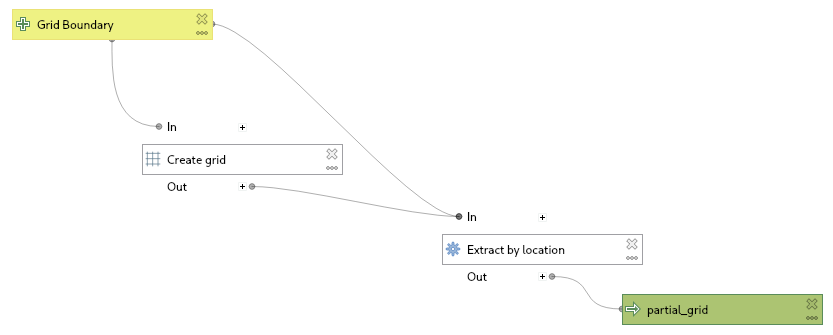
Da das erzeugte Grid deckt einen rechteckigen Bereich um die Gemeinde ab, nicht alle erzeugten Felder liegen aber auch innerhalb der Gemeinde. Das kann man manuell korrigieren, oder mit “Extract by location” das erzeugte Gitter mit den Gemeindegrenzen via “intersect” verschneiden.

Dieser Vorgang wurde mit dem “Model Designer” umgesetzt und der erzeugte Layer manuell als GeoPackage gespeichert.

Blattschnittgitter stylen

Für einen gefälligen Atlas wurde der Ansatz aus dem referenzierten Vortrag von Claas Leiner verfolgt. Mit einer rule-based symbology sowie label und der Regel “id” = @atlas_pagename wird das zentrale Element der Atlas-Seite neutral gestaltet, d.h. ohne Füllung, Rahmen und Text während die übrigen Elemente (ELSE) eine zu 50% deckende weiße Füllung und eine Beschriftung erhalten.

Layout erstellen

Das A4-Hochformat Layout erhält eine Karte “Controlled by Atlas” mit einer “Fixed scale”. Die Karte erhält auch zwei Grids aus dem EPSG:4326. Eines mit Koordinaten im Format “Degree, Minute” und einem Interval von 1/60/10. Ein Zweites mit Koordinaten im Format “Degree” und einem Interval von 1/1000. Um die Beiden unterscheidbar zu halten sind die Koordinaten einmal innerhalb des Rahmens, einmal außerhalb sowie mit einem “Solid” Grid bzw. “Cross” ausgeführt.

Zwei Scalebar-Elemente (eines vom Stil “Single Box”, eines “Numeric”) helfen beim Abschätzen von Entfernungen in der Karte.

Ein Label mit dem Inhalt “Blatt [% @atlas_pagename %]” sorgt für die Identifizierung des Blattes.

Ein weiteres Label mit Lizenzhinweisen rundet das Blatt ab.

Ergebnis

Ein Blatt des erstellten Atlas

TODO

  • Adressen importieren und darstellen
  • Adressen mit Blattschnitt verschneiden und Liste erzeugen
  • Übersichtskarte (Blattschnitt) erstellen

Deploy Win 11 .wim to external SSD (UEFI)

Used Tools

– PC running Windows 10 21H2 (OS build 19044.1706)
– Cheap external USB3 to M2 SATA case with a 120GB drive
– Windows 11 iso (Nov 2021)
– Elevated command prompt

Prepare Drive

Start diskpart and partition the drive in accordance to Microsoft documentation.

list disk
select disk 1
clean
convert gpt
create partition efi size=100
format quick fs=fat32 label="System"
assign letter="S"
active
create partition msr size=16
create partition primary 
format quick fs=ntfs label="Windows"
assign letter="W"
list volume
exit

Apply .wim

Mount the .iso for access to the sources\install.wim and determine the index to use.

dism /Get-WimInfo /WimFile:D:\sources\install.wim

Apply image according to Microsoft documentation:

dism /Apply-Image /ImageFile:D:\sources\install.wim /Index:4 /ApplyDir:W:\

Configure system partition.

W:\Windows\System32\bcdboot W:\Windows /s S:

Boot to SSD

Press F12 or whatever your computer/mainboard requires to select the boot medium. Booting from external drives may be disabled in the your mainboard’s setup.
Windows will install drivers and reboot afterwards, so be prepared to press F12 again.

Using rclone to synchronize a OneDrive share (headless)

Goals

Synchronize a OneDrive folder, re-share it locally via a web server.

TODO: Run rclone as a service

Prerequisistes

  • Single-Use OneDrive Account with a shared folder
  • Alpine Linux VM

Installation

Enable the community repository in /etc/apk/repositories. Update and install rclone and nginx.

# apk update
# apk upgrade
# apk add rclone nginx

Configuration

The local files will be stored under /var/www/wifishare, thus rclone will synchronize to this location and nginx will use this as root (with autoindex on).

Create folder

# mkdir /var/www/wifishare

Configure rclone

Start the configuration step (ideally via SSH where you can copy paste the token later on):

# rclone config

Make a new remote (n)
Name it (wifishare)
Choose provider (onedrive)
Leave client_id and client_secret empty
region: global (depends on your setup)
No advanced config
No auto config (since we are running headless)

On a machine with a web browser:

$ rclone authorize "onedrive"

and follow the login process in the browser. Then, copy and paste the token as indicated.
config_type onedrive

Initial sync (interactive):

rclone sync -i wifishare:/public /var/www/wifishare

Configure nginx

Set root directory and enable directory listing. In this case, by modifying the default config.

server {
	listen 80 default_server;
	listen [::]:80 default_server;

	root /var/www/wifishare;

	location / {
		autoindex on;
	}
}

Restart and enable service

# rc-service nginx restart
# rc-update add nginx